GSMCalls
Cloud Managed Mobile SIP Gateway

Turn Mobile Phones Into Powerful SIP Gateways

Without any cables.

Two cable-free options: connect phones over Bluetooth with Wireless Connect, or plug in the GSMCalls Smart Bridge microcontroller — both with digital wideband HD audio, and everything managed from one cloud platform.

Designed for telecom operators, integrators and distributed gateway environments.

  • SIP
  • WebRTC
  • Asterisk
  • FreePBX
  • 3CX
  • Kamailio
  • OpenSIPS
  • SBC
Designed for standard SIP environments.
The platform

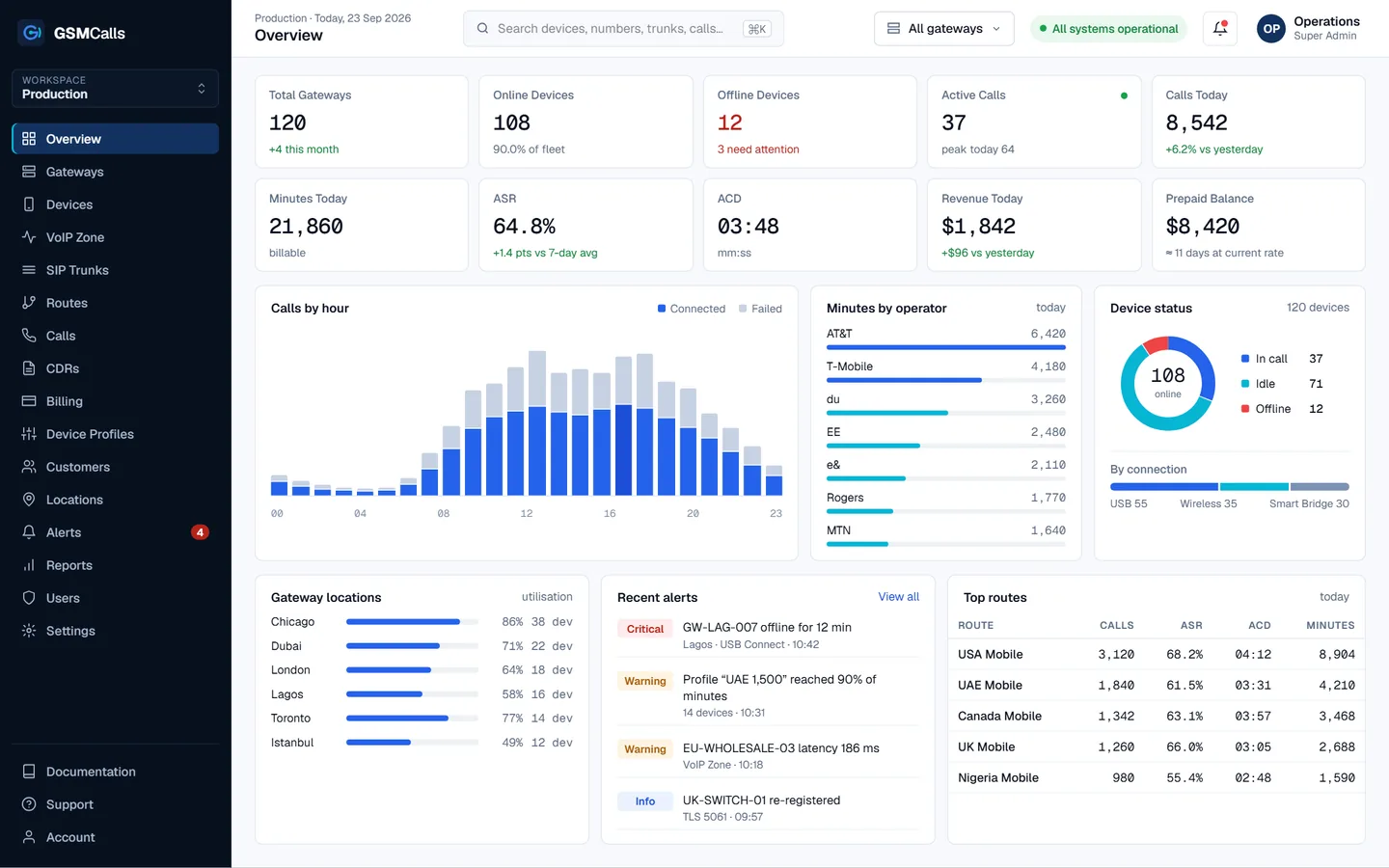
See every gateway, phone, trunk, call and minute from one dashboard.

Live status, SIP health, prepaid balances and full CDRs — for one site or every site you run.

Solutions

One Platform. Three Ways to Connect.

Pick the architecture that fits each site. Every option runs on the same cloud platform, with the same routing, CDRs, billing and monitoring.

Gateway PCUSB hub10 phones · 1 powered hub

GSMCalls USB Connect

Wired

Android phones connect to a local gateway computer through a powered USB hub and audio cabling. Predictable, physical, easy to rack.

  • Reliable wired connectivity
  • Straightforward deployment
  • One central gateway computer
  • Many phones per gateway
  • Remote monitoring from the cloud
  • Native SIP integration

Best suited forfixed gateway rooms and dense Android deployments where wired connections are preferred.
Mini PCBT hubno audio cables to the phones

GSMCalls Wireless Connect

Bluetooth

Less wiring. Faster deployment. Phones pair with the gateway over Bluetooth — Android and iPhone models where validated.

  • Cleaner installation, fewer cables
  • Easier device replacement
  • Flexible phone placement
  • Android and iPhone where supported
  • Scale by adding adapters
  • Same cloud management and CDRs

Best suited forquick installs, mixed Android and iPhone fleets, and sites where cabling is impractical.

Compatible Bluetooth devices subject to model and OS validation.
MobilenetworkPhone +GSMCalls appWi-Fi / 4GHD wideband audioGSMCallsCloudUSB-CPD powerSmart Bridgemicrocontrollerno gateway PC

GSMCalls Smart Bridge

Hardware

Dedicated phone-to-platform connectivity — no PC. A compact microcontroller bridge plugs into each phone's USB-C (short Y/PD cable with charging pass-through), and the GSMCalls app streams digital wideband HD audio straight to the cloud over Wi-Fi or mobile data.

  • No gateway PC required
  • Digital wideband (HD) audio
  • App streams straight to the cloud
  • Compact, one bridge per phone
  • Charging pass-through on USB-C
  • Remotely managed from the portal

Best suited fordistributed phones anywhere with Wi-Fi or data, where you want HD audio and no PC.

Compare

Which architecture fits your site?

Wireless Connect

Best suited for
Fast, low-cable deployments and iPhone support
Connection type
Bluetooth hands-free to a gateway PC
Phone compatibility
Validated Android and iPhone models
Physical cabling
Power only, no audio cabling
Deployment complexity
Low
Device density
Medium, per adapter
Ease of replacement
Re-pair over Bluetooth
Audio interface
Bluetooth hands-free audio
Recommended deployment
Offices, pop-up and mixed fleets
Remote management, SIP, CDRs, billing, monitoring, multi-site
Included
Phone compatibility depends on model, OS version and validation status — see the Compatibility list.
Architecture

From your softswitch to the mobile network.

GSMCalls Cloud sits between your SIP platform and your phones. Hover a method to follow the call path.

  1. SIP · PBX · Softswitch
  2. GSMCalls CloudControl platform · routing · CDR · billing
  3. USB Connect
  4. Android phones · USB
  5. Mobile operator networks
Platform capabilities

Everything between the SIP trunk and the SIM card.

One control plane for devices, trunks, routing, usage and money — built for operators who run more than one site.

  • Real-time dashboard

    Calls, ASR, ACD, minutes and revenue as they happen.

  • Device management

    Signal, battery, SIM, operator and status for every phone.

  • VoIP Zone

    Trunk registration, sessions, codecs, latency and loss.

  • SIP trunks & routing

    TLS, ACLs, codec priority, prefix routing and failover.

  • CDRs

    Every call with billable time, rate, cost and cause code.

  • Prepaid billing

    Balances, top-ups and minute allocations with hard stops.

  • Device profiles

    Minutes, time windows, countries and limits as reusable rules.

  • Alerts & health

    Offline phones, weak signal, trunk faults and usage thresholds.

Inside the GSMCalls platform

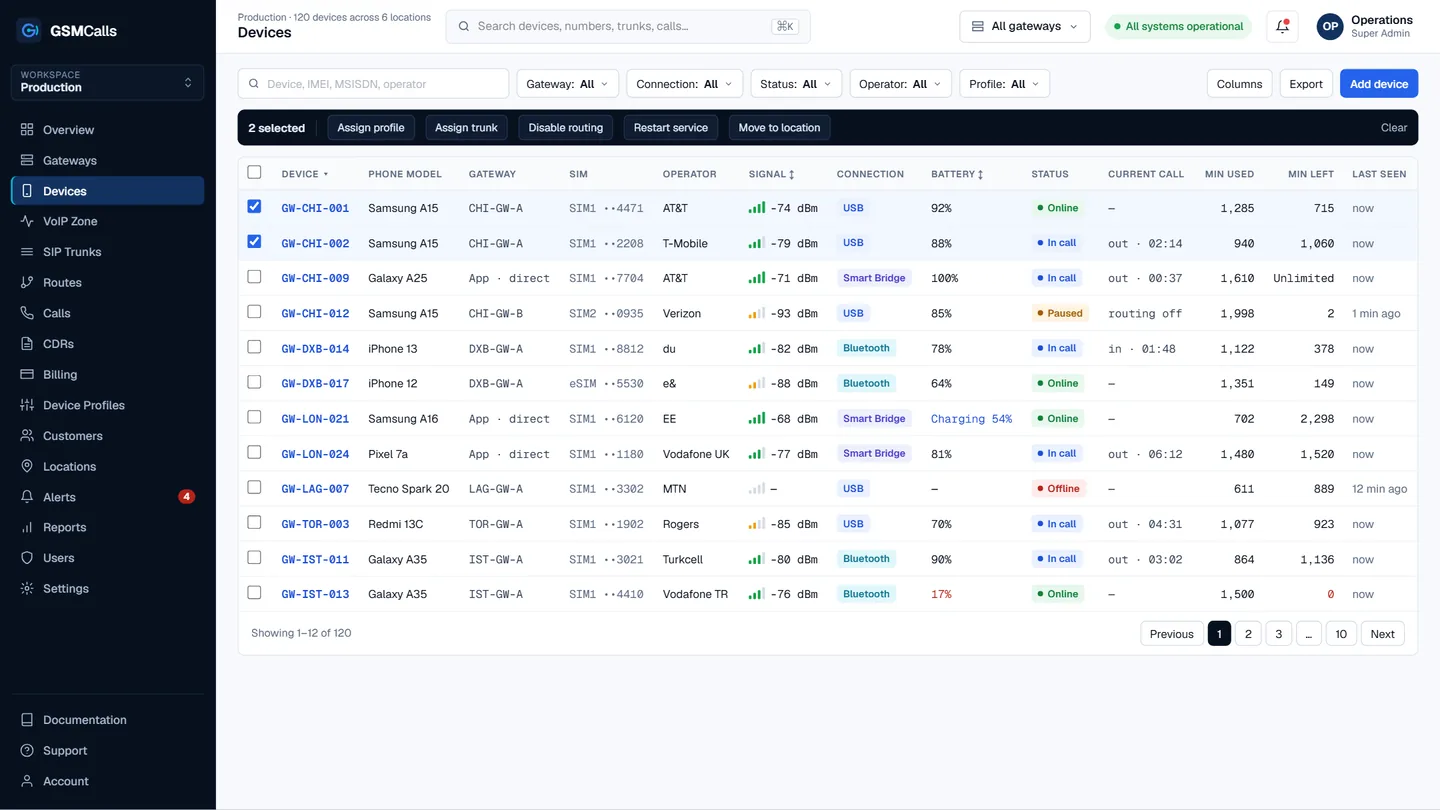
Device management

Every phone, every SIM, one table.

See model, operator, signal, connection method, battery and minutes for each device — then act on one or a hundred at once.

  • Search, filter and sort across all locations
  • Bulk assign profiles and trunks
  • Restart the gateway service remotely
  • Drill into any device for IMEI, SIM and history
Explore device management
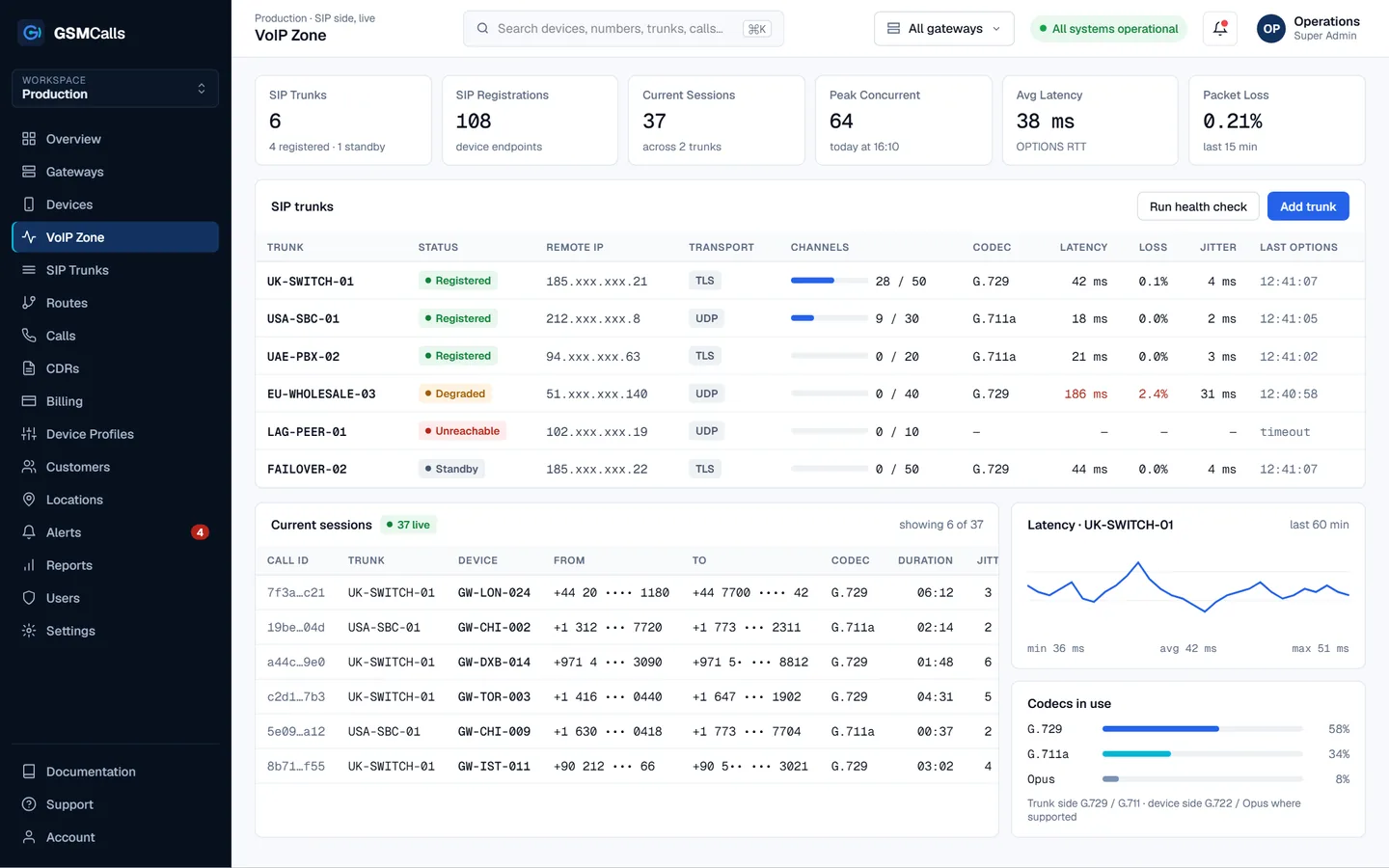
VoIP Zone

Know your SIP side is healthy before customers do.

Registrations, live sessions, codecs, latency and packet loss for every trunk, with clear status and automatic failover.

  • Registered, degraded and unreachable at a glance
  • Live sessions per trunk and device
  • OPTIONS health checks and latency history
  • Failover to a standby trunk
Explore the VoIP Zone
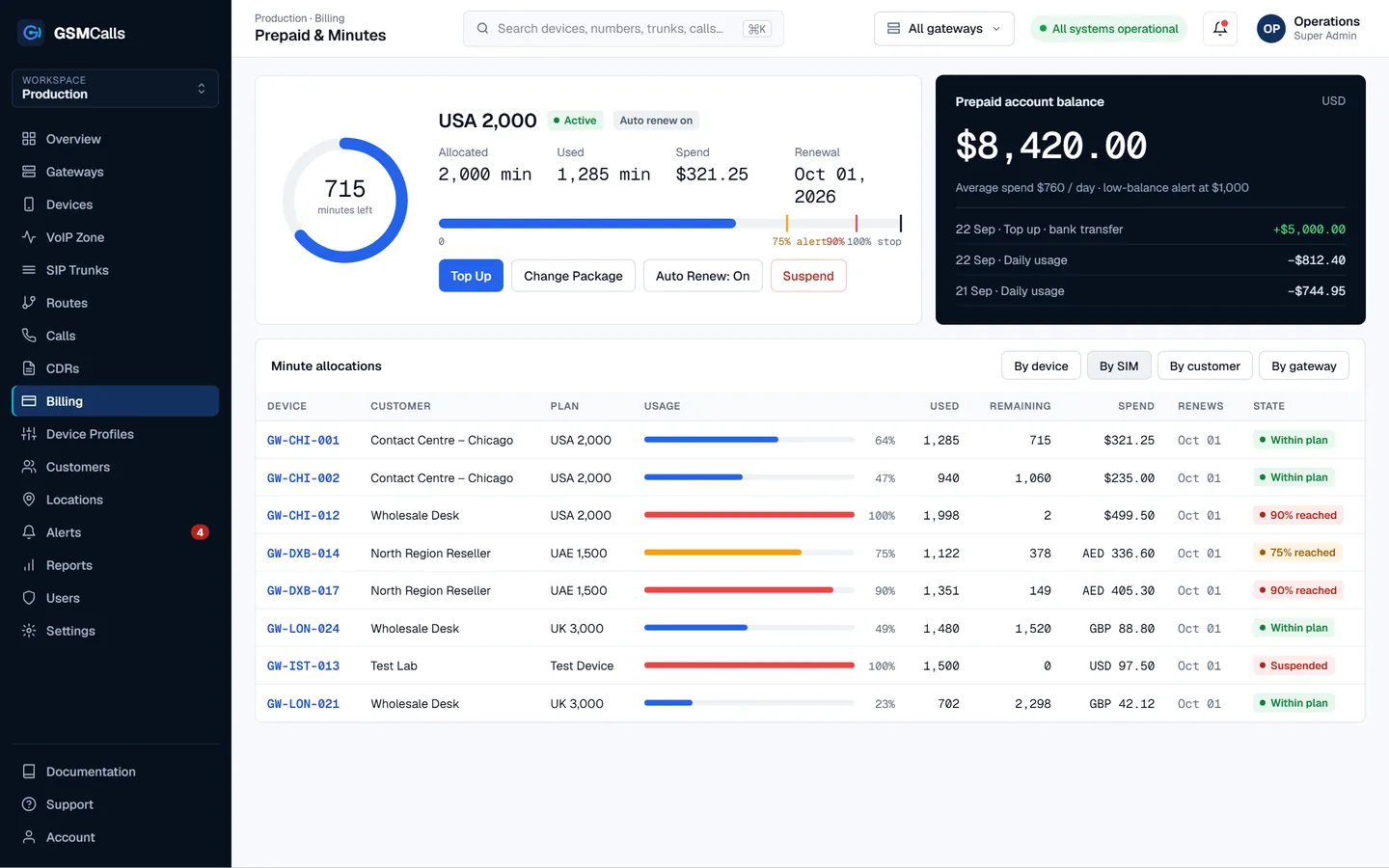
Prepaid billing

Control every minute.

Create profiles that define how many minutes each device, SIM, customer or gateway can use — with alerts before anyone runs out.

  • Allocations per device, SIM, customer or gateway
  • Alerts at 75%, 90% and 100%
  • Top up, suspend, change package, auto renew
  • Balances in the currency you sell in
Explore prepaid billing
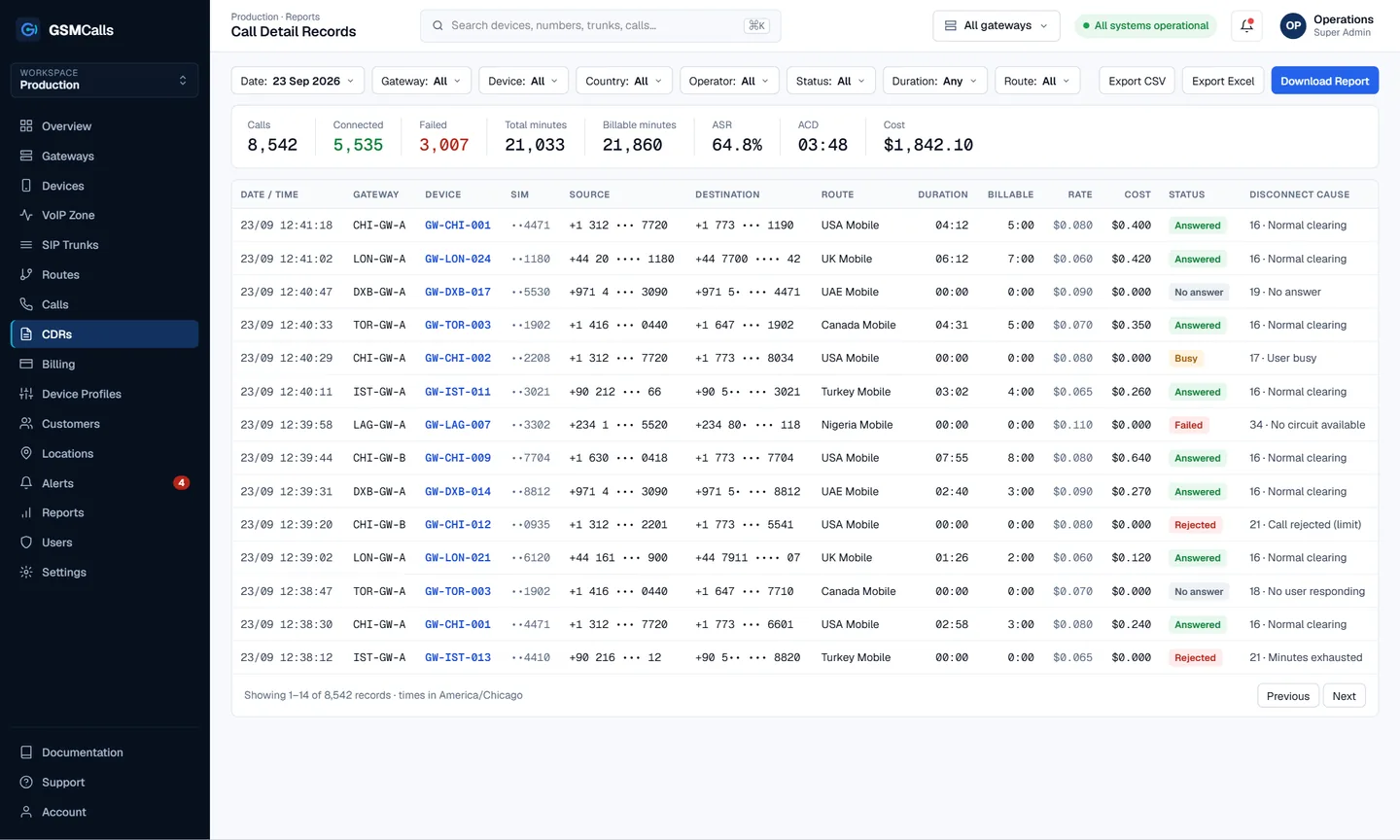
CDRs

Every call accounted for.

Full call detail records with billable duration, rate, cost and disconnect cause — filtered your way and exported in one click.

  • Filter by date, gateway, device, country, operator, route
  • Summary bar: calls, ASR, ACD, minutes, cost
  • Export CSV, Excel or a formatted report
  • Cause codes that explain every failed call
Explore CDRs
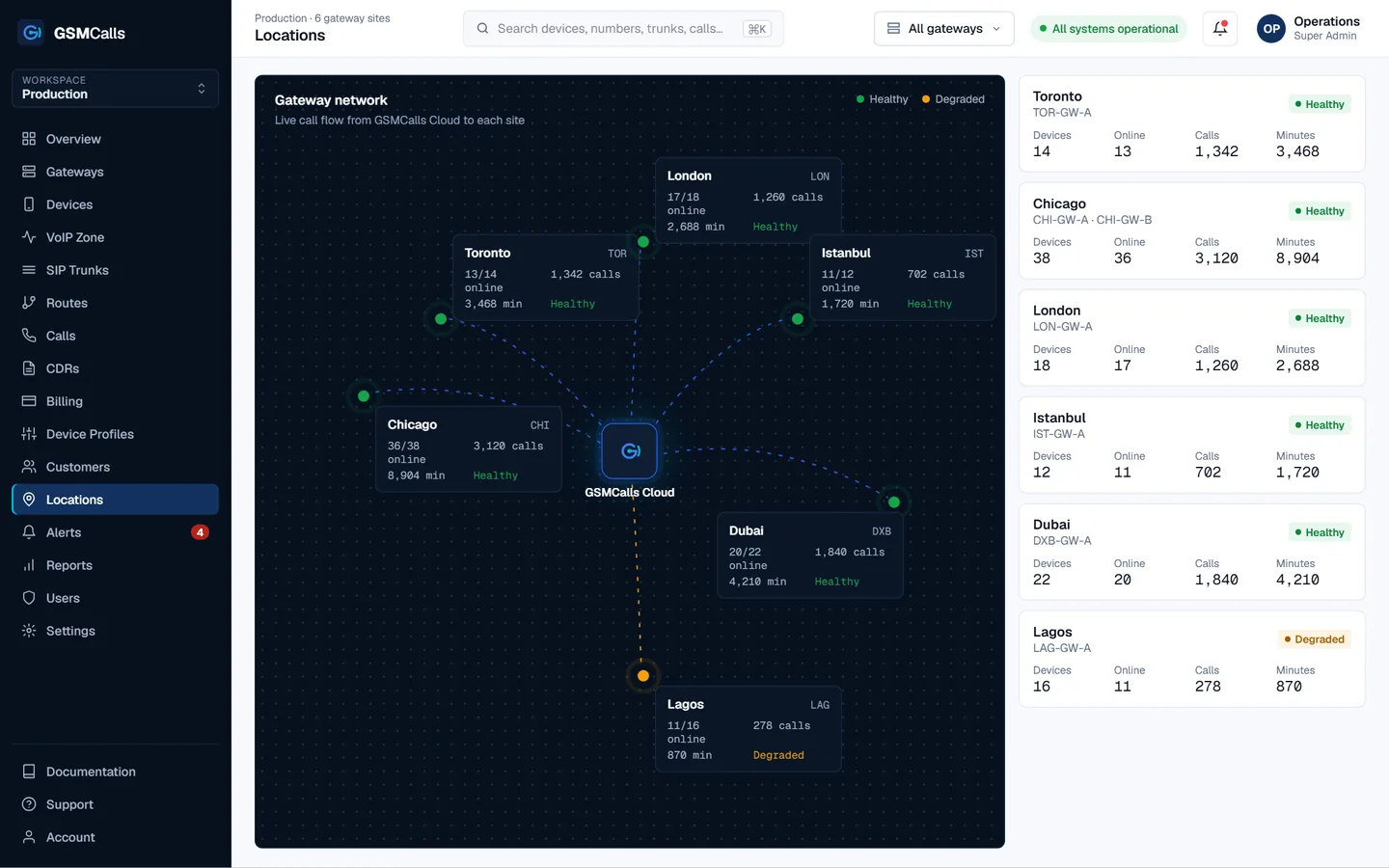
Multi-location

One Cloud. Every Gateway Location.

Run gateways in Chicago, Toronto, London, Istanbul, Dubai and Lagos from one portal. Each site reports devices, calls, minutes and health in real time.

gateway locations
6
managed devices
120
calls today
8,542
portal
1
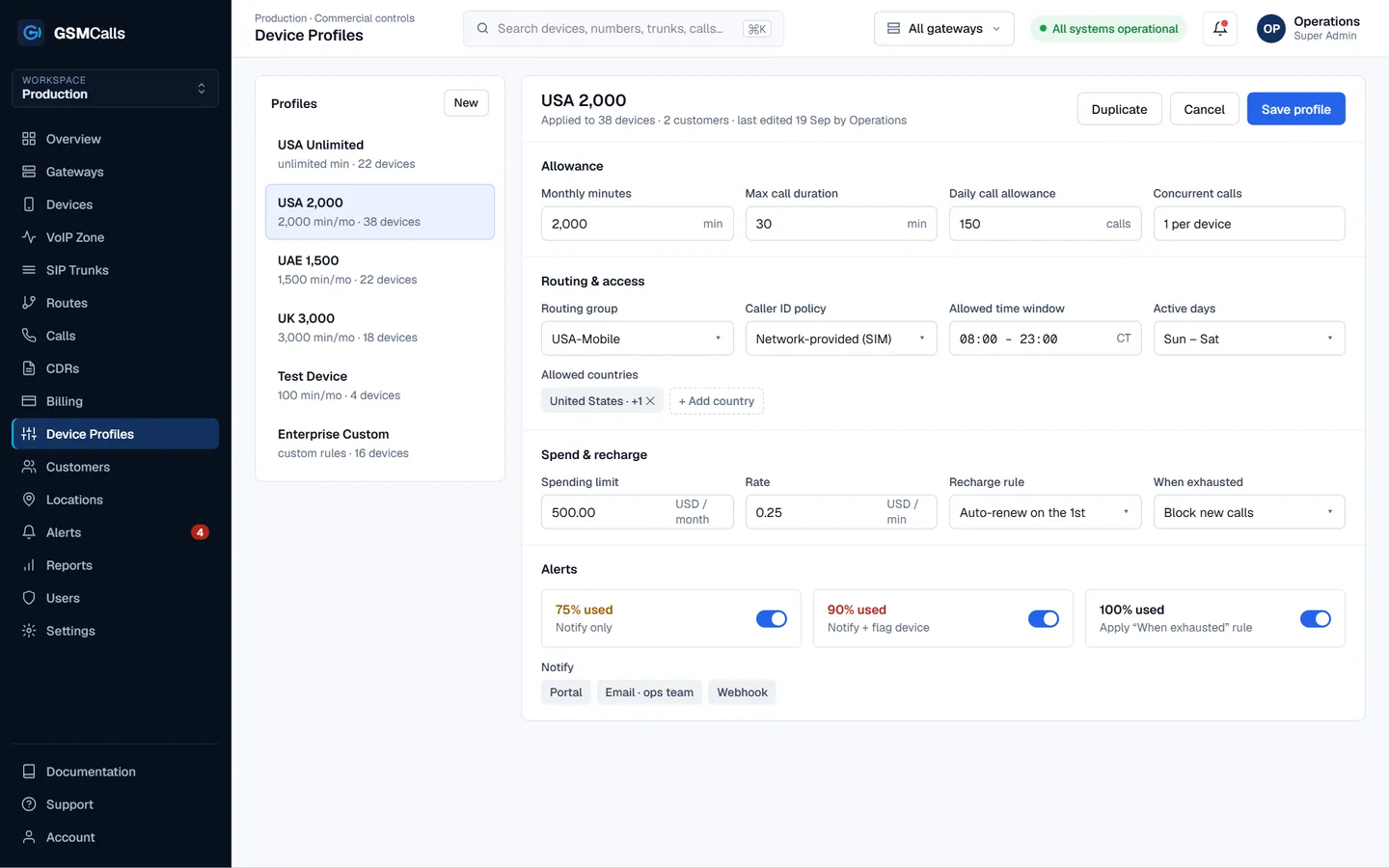
Device profiles

Rules that travel with every device.

Define minutes, call length, daily limits, routing, caller-ID policy, countries, time windows and spend once — then apply the profile to any device, SIM or customer.

  • USA Unlimited

    22 dev
    UnlimitedUSA only24 h
  • USA 2,000

    38 dev
    2,000 minMax 30 min08–23 h
  • UAE 1,500

    22 dev
    1,500 minUAE onlyAED limit
  • UK 3,000

    18 dev
    3,000 minUK onlyAuto renew
  • Test Device

    4 dev
    100 minAll countriesLab hours
  • Enterprise Custom

    16 dev
    CustomPer-customerWebhooks
Why GSMCalls

Cloud software first. Hardware flexible.

  • Flexible Hardware

    Build gateways around commercially available phones rather than expensive proprietary gateway chassis.

  • Three Connection Architectures

    Choose wired USB, Bluetooth wireless or Smart Bridge connectivity — per site, per rack.

  • Cloud Control

    Monitor devices, calls, trunks, minutes and gateways remotely, from any browser.

  • Multi-Site Ready

    Operate gateway deployments in multiple locations from one platform and one login.

  • Commercial Controls

    Manage prepaid minutes, spending limits, customer profiles and usage without spreadsheets.

  • Built to Scale

    Start with a few phones and grow to hundreds without rebuilding your management layer.

How it works

Live in four steps.

Start Your Gateway
  1. Step 01

    Create your account

    Open your GSMCalls workspace and invite your team.

    WorkspaceRoles
  2. Step 02

    Install your gateway

    Pair phones with the GSMCalls app and Smart Bridge, or connect them to a site gateway over Bluetooth or USB.

    USBBluetoothSmart Bridge
  3. Step 03

    Connect SIP

    Add your PBX, SBC, softswitch or SIP trunk — TLS supported.

    PBXSBCTrunk
  4. Step 04

    Start managing calls

    Monitor calls, devices, minutes and performance from the cloud.

    CDRBillingAlerts
Who it's for

Built for teams that run voice for a living.

GSMCalls supports lawful, authorised deployments — integrating mobile networks with your existing SIP estate.

  • VoIP Service Providers

    Add mobile termination capacity you manage yourself.

  • Wholesale Voice Operators

    Route per prefix across sites with full CDRs.

  • Call Centers

    Local mobile presence for agents on your existing PBX.

  • SIP Providers

    Offer mobile-network reach to your SIP customers.

  • PBX Integrators

    Connect Asterisk, FreePBX or 3CX to mobile lines.

  • Managed Service Providers

    Run many customers from one multi-tenant portal.

  • Telecom Resellers

    White-label the platform under your own brand.

  • International Calling Businesses

    Reach mobile users abroad over authorised routes.

  • Enterprise Communications

    Bridge corporate SIP with company mobile SIMs.

  • Technology Integrators

    Build mobile voice into your own products.

White label

Your Gateway. Your Brand.

Resellers and managed service providers run GSMCalls under their own name. Customers see your portal, your colours and your support details.

  • Company name
  • Logo
  • Portal URL
  • Brand colours
  • Support email
  • Support phone
  • Login screen
  • Invoices
  • Customer portal
Pricing

Plans that grow with your gateway estate.

One flat monthly price per plan — not per device.

Professional

Most popular

For operators running several gateways.

$150/ month
  • Up to 20 phones
  • Multiple gateways
  • Multiple locations
  • Advanced CDR
  • Device profiles
  • Prepaid usage management
  • Alerts
  • API (coming soon)
  • Priority support
Start Professional
Prices in USD per month. Taxes, carrier airtime and SIM costs are not included. Features marked Coming Soon are not yet available.Compare all four plans
Documentation

Clear docs from first phone to fiftieth site.

Step-by-step guides for each connection method, SIP configuration, routing, CDRs and billing.

REST API · devicesComing Soon
curl https://api.gsmcalls.net/v1/devices?status=online \
  -H "Authorization: Bearer $GSMCALLS_TOKEN"

{
  "data": [{
    "id": "GW-CHI-001",
    "connection": "usb",
    "operator": "AT&T",
    "signal_dbm": -74,
    "minutes_remaining": 715
  }]
}
FAQ

Questions operators ask first.

Still unsure? Talk to an engineer — we'll map your site to the right architecture.

Talk to an Engineer

Commercially available Android phones, and iPhone models over Wireless Connect where validated. Every model is listed with its status — Verified, Beta, Testing or Not Supported — on the Compatibility page.

Build Your Mobile Gateway Infrastructure

Connect a few phones or manage hundreds of devices across multiple locations from one platform.